Parameters, Validators, and Actions
This page explains how to configure the input parameters shown in the script launch dialog. It covers the available value sources for each parameter, display and visibility options, input validation via regular expressions, and combo box actions that dynamically control the dialog at runtime.
Parameters
Parameters define what the user sees and enters in the dialog before running a script. They are passed to the script in the order they are listed.
Declaring parameters
First, list all parameter identifiers for the script. The order here determines the order in the dialog and the order in which values are passed to the script.
oneclickext.scripts.<scriptitem>.params: p1 p2 p3
The identifiers (p1, p2, etc.) are arbitrary; they are only used internally to look up the other properties.
Each parameter needs at least a display name:
oneclickext.scripts.<scriptitem>.p1.name: IP Address
Value sources
A parameter's value can come from one of the following sources. Only one source should be set per parameter.
Static default value:
oneclickext.scripts.<scriptitem>.p1.value: SpecAdmin
Supports the %DATE% variable, which is replaced with the current date and time.
Spectrum attribute of the selected model:
oneclickext.scripts.<scriptitem>.p1.attr: 0x12d7f
The value is read from the specified attribute ID on the model selected in the console. If reading fails, the static .value is used as a fallback (unless .emptyvalueonerror is set).
Note
devattr (reading from the device of the selected model) is not supported for multi-device scripts.
Spectrum attribute of the device linked to the selected model:
oneclickext.scripts.<scriptitem>.p1.devattr: 0x12d7f
Reads the attribute from the device reached via the model's Significant_Model_ID (attribute 0x12a56). Only for single-device scripts.
System parameter:
oneclickext.scripts.<scriptitem>.p1.sysparam: osuser
Available values:
| Value | Description |
|---|---|
osuser |
OS user name of the session |
specuser |
Spectrum user name |
starttime |
Formatted start time (format set by oneclickext.scripts.starttime) |
hostname |
Hostname of the client machine |
scriptip |
IP address of the current device (multi-device scripts only) |
scriptdns |
DNS name of the current device (multi-device scripts only) |
devlist |
Full device list file (multi-device scripts only) |
param1, param2, … |
Command-line parameters (standalone mode only) |
URL parameter (for web-invoked scripts):
oneclickext.scripts.<scriptitem>.p1.urlparam: myParam
The value is taken from the URL query string: &myParam=<value>.
Combo box (dropdown):
oneclickext.scripts.<scriptitem>.p1.combo: Option A|Option B|Option C
Pipe-separated list of choices. See Combo boxes and actions below.
Display options
# Hide the parameter row entirely (value is still passed to the script)
oneclickext.scripts.<scriptitem>.p1.hidden: false

# Show asterisks instead of the actual value (for passwords). Not applicable to combo boxes.
oneclickext.scripts.<scriptitem>.p1.visible: true

# Make the field read-only. Not applicable to combo boxes.
oneclickext.scripts.<scriptitem>.p1.editable: true

# Show empty value when an attribute read fails, instead of an error string
oneclickext.scripts.<scriptitem>.p1.emptyvalueonerror: false

# Tooltip text shown on hover
oneclickext.scripts.<scriptitem>.p1.tooltip: Enter the management IP address

# Exclude this parameter from the script command line (value is not passed to the script)
oneclickext.scripts.<scriptitem>.p1.ignore: false
Multiline text area
A parameter can be rendered as a multi-row text area instead of a single-line input field:
oneclickext.scripts.<scriptitem>.p1.multiline: true

# Number of visible rows (default: 5)
oneclickext.scripts.<scriptitem>.p1.rows: 8
Multiline parameters are typically used as display-only preview fields. Set editable: false and ignore: true to prevent the content from being passed to the script.
File upload
A parameter can be rendered as a file browse button. When the user selects a file, it is uploaded to the server and saved under oneclickext.scripts.upload.path. The value passed to the script is the server-side path to the saved file (<upload.path><original_filename>.<timestamp>).
oneclickext.scripts.<scriptitem>.p1.fileloader: true

# Label on the browse button
oneclickext.scripts.<scriptitem>.p1.buttontext: Upload File

# Enable the Run button only after a file has been loaded (default: false)
oneclickext.scripts.<scriptitem>.p1.enonload: false

# Restrict the file chooser to specific extensions (space-separated)
oneclickext.scripts.<scriptitem>.p1.filefilter: txt csv

# Label shown for the file type filter in the chooser dialog
oneclickext.scripts.<scriptitem>.p1.filtertext: Mapping Files

# Load the file content into another parameter for preview (e.g. a multiline field)
oneclickext.scripts.<scriptitem>.p1.target: P2
The server saves a copy of the uploaded file to the directory configured by oneclickext.scripts.upload.path. A timestamp is appended to the filename to avoid collisions:
# Directory where uploaded files are stored (relative to the daemon's working directory)
oneclickext.scripts.upload.path: ../upload/

# Timestamp format appended to uploaded filenames (Java SimpleDateFormat pattern)
oneclickext.scripts.upload.ts: yy.MM.dd_HH.mm.ss.SSS
File lifecycle
When the user selects a file, the content is transferred to the OcExt Daemon, which saves it
to upload.path on the Scriptserver. The daemon never deletes this file — the script receives
the server-side path as a parameter and is responsible for deleting the file after use.
How the file reaches the daemon depends on the deployment:
- Standalone (web browser) or Spectrum with JNLP (javaws): The file is uploaded directly
to the OcExt Daemon, which saves it to
upload.path. The script deletes it after execution. - WebSwing,
isolatedFS=true: The browser first uploads the file to a per-session isolated directory on the WebTomcat server. This copy is deleted automatically when the browser session ends. The daemon also saves a copy toupload.path, which the script deletes. - WebSwing,
isolatedFS=false: The browser uploads the file to a persistent location on the WebTomcat server. This copy is not deleted automatically and must be removed manually by an administrator. The daemon'supload.pathcopy is still deleted by the script.
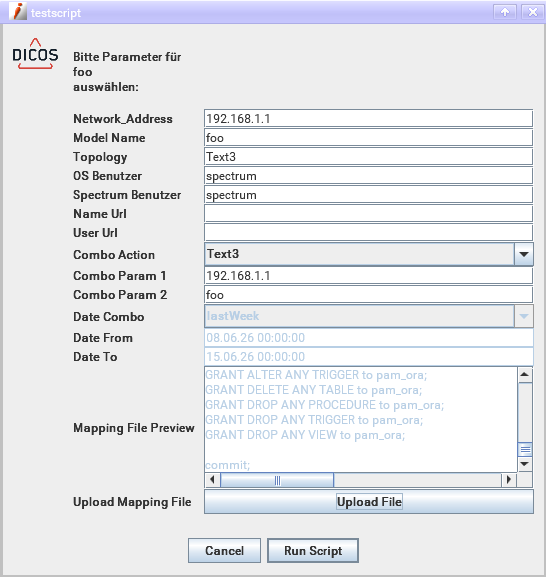
Typical pattern — file upload with preview:
# p1: browse button that loads the file and enables the Run button
oneclickext.scripts.MyScript.p1.name:        Upload Mapping File
oneclickext.scripts.MyScript.p1.fileloader:  true
oneclickext.scripts.MyScript.p1.buttontext:  Browse...
oneclickext.scripts.MyScript.p1.enonload:    true
oneclickext.scripts.MyScript.p1.filefilter:  txt csv
oneclickext.scripts.MyScript.p1.filtertext:  Mapping Files
oneclickext.scripts.MyScript.p1.target:      P2
oneclickext.scripts.MyScript.p1.validator:   no_file

# p2: read-only multiline preview, not passed to the script
oneclickext.scripts.MyScript.p2.name:      File Preview
oneclickext.scripts.MyScript.p2.multiline: true
oneclickext.scripts.MyScript.p2.rows:      8
oneclickext.scripts.MyScript.p2.editable:  false
oneclickext.scripts.MyScript.p2.ignore:    true
oneclickext.scripts.MyScript.p2.value:     No file loaded.
Input field width
# Width in pixels of all input fields in this script's dialog (default: 180)
oneclickext.scripts.<scriptitem>.width: 230
Validators
A validator checks user input against a regular expression before the script is allowed to run. If the input does not match, an error message is shown.
Validators are defined globally and then referenced per parameter:
# Define the validator
oneclickext.scripts.validator.<name>.regexp:  <regular expression>
oneclickext.scripts.validator.<name>.message: <error message shown to user>

# Reference from a parameter
oneclickext.scripts.<scriptitem>.p1.validator: <name>
Example
oneclickext.scripts.validator.valid_ip.regexp:  (25[0-5]|2[0-4][0-9]|1[0-9][0-9]|[1-9][0-9]|[0-9])\.(25[0-5]|2[0-4][0-9]|1[0-9][0-9]|[1-9][0-9]|[0-9])\.(25[0-5]|2[0-4][0-9]|1[0-9][0-9]|[1-9][0-9]|[0-9])\.(25[0-5]|2[0-4][0-9]|1[0-9][0-9]|[1-9][0-9]|[0-9])
oneclickext.scripts.validator.valid_ip.message: Please enter a valid IP address.

oneclickext.scripts.validator.non_empty.regexp:  .*\S+.*
oneclickext.scripts.validator.non_empty.message: This field must not be empty.

oneclickext.scripts.MyScript.p1.validator: valid_ip
Combo boxes and actions
A parameter can be displayed as a dropdown (combo box). When the user selects an entry, optional combo actions can automatically update other parameters or enable/disable the Run button.
Defining a combo box
# Pipe-separated list of options
oneclickext.scripts.<scriptitem>.p1.combo: Option A|Option B|Option C

# Return the index (1, 2, 3, ...) instead of the text value (default: false)
oneclickext.scripts.<scriptitem>.p1.comboidx: false

# Pre-select the nth entry (1-based; default: first entry)
oneclickext.scripts.<scriptitem>.p1.combosel: 1
Combo actions
Actions are triggered when a specific combo entry is selected. They are indexed by selection number (1 = first entry, 2 = second, etc.).
# List of action names to execute when entry n is selected
oneclickext.scripts.<scriptitem>.p1.comboaction.<n>.list: action1 action2

# Inline action definition (scoped to this parameter)
oneclickext.scripts.<scriptitem>.p1.comboaction.<actionname>.action: <action>
oneclickext.scripts.<scriptitem>.p1.comboaction.<actionname>.value:  <value>
oneclickext.scripts.<scriptitem>.p1.comboaction.<actionname>.param:  <Pn>
Actions can also be defined globally (shared across scripts) and referenced by name:
# Global action definition
oneclickext.scripts.comboaction.<name>.action: <action>
oneclickext.scripts.comboaction.<name>.value:  <value>
oneclickext.scripts.comboaction.<name>.param:  <Pn>
Available actions
| Action | Value | Parameter | Description |
|---|---|---|---|
enable |
— | Pn |
Enable the input field of parameter n |
disable |
— | Pn |
Disable the input field of parameter n |
clear |
— | Pn |
Clear the value of parameter n |
text |
text to insert | Pn |
Set the value of parameter n to the given text |
date |
date specifier | Pn |
Set parameter n to a computed date range value |
rbenable |
— | — | Enable the Run button |
rbdisable |
— | — | Disable the Run button |
Date specifiers for the date action: lastDay.from, lastDay.to, lastWeek.from, lastWeek.to, lastMonth.from, lastMonth.to.
Disabling the Run button by default
To force a user to make a combo selection before the script can run, disable the Run button in the initial state and use rbenable to re-enable it:
oneclickext.scripts.<scriptitem>.runbutton.enabled: false

oneclickext.scripts.comboaction.en_rb.action: rbenable
oneclickext.scripts.comboaction.di_rb.action: rbdisable
Exit code formatting
After a script finishes, a completion dialog reports the exit code. The output window remains open so the user can review the full output:
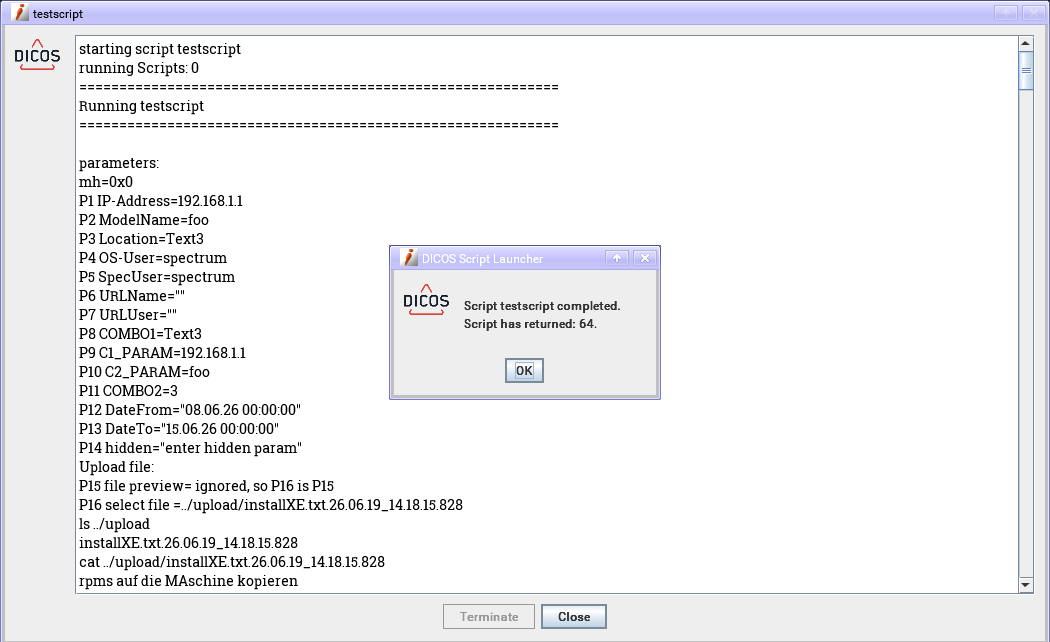
Exit codes can be highlighted with HTML formatting in the output dialog. Define named format rules and list them in the order they should be applied:
oneclickext.scripts.exitcode.formats: ltZero zero gtZero

oneclickext.scripts.exitcode.format.zero.op:    eq
oneclickext.scripts.exitcode.format.zero.val:   0
oneclickext.scripts.exitcode.format.zero.start: <font size='5' color='green'>
oneclickext.scripts.exitcode.format.zero.end:   </font>

oneclickext.scripts.exitcode.format.gtZero.op:    gt
oneclickext.scripts.exitcode.format.gtZero.val:   0
oneclickext.scripts.exitcode.format.gtZero.start: <font size='5' color='red'>
oneclickext.scripts.exitcode.format.gtZero.end:   </font>

oneclickext.scripts.exitcode.format.ltZero.op:    lt
oneclickext.scripts.exitcode.format.ltZero.val:   0
oneclickext.scripts.exitcode.format.ltZero.start: <font size='5' color='blue'>
oneclickext.scripts.exitcode.format.ltZero.end:   </font>
Supported operators: eq (equal), gt (greater than), lt (less than).
The text block surrounding the output can also be formatted:
oneclickext.scripts.exitcode.format.text.start: <font size='5' face='verdana' color='black'>
oneclickext.scripts.exitcode.format.text.end:   </font>