Git Integration
This article shows how to manage your services with your own Git repository with DICOS API Gateway Manager.
Basic Requirements:
- Company Git repository
- Authentication with SSH keys to the Git repository
- Direct communication between DICOS API Gateway Manager and the Git repository
User Requirements:
- User can create new Git repositories
- User can add a SSH key to the Git repository
Create SSH keys for authentication
To authenticate against a Git repository, DICOS API Gateway Manager is using SSH keys.
You can create a unique key-pair in the UI directly over the menu
- [Configuration] → [git Credentials] → [Add new entry]
- Add a custom name → [Save]
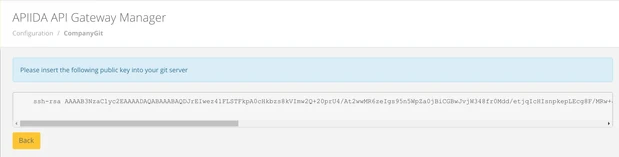
- Export the public key to your Git repository in "authorized_keys" (please read the instruction from your Git provider)


Set up a git integration for a service
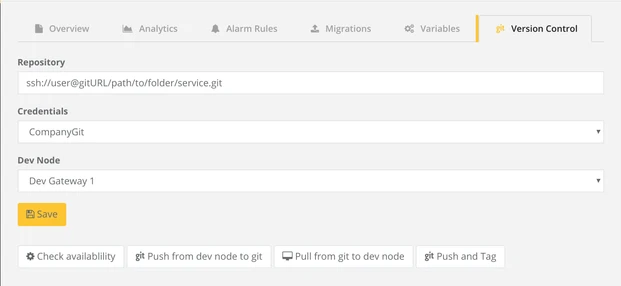
You can set up a Git integration in the service settings of a specific service.
- Go to your Service and click on the tab [git Version Control]
- Include the connection string to your Git repository, including protocoll (e.g. ssh), username, Git URL and path. For example: ssh://user@gitURL/path/to/folder/service.git
- Define which credentials should be used. You can create credentials in the section above
- Define to/from which node the service should be migrated
- Click on [Save]
It is recommended to use a separate Git repository for every Service.
If you want to test the connection, you can click on [Check availability].
Push (MigrateOut) a service version into a Git repository
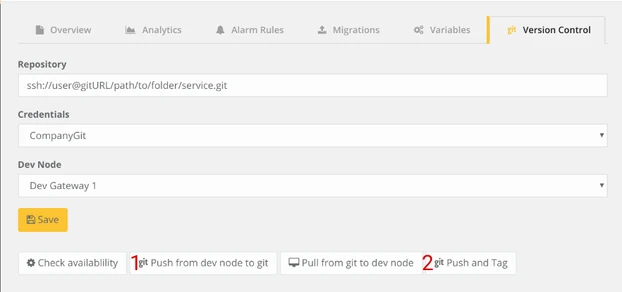
1/ Standard push to Git repository
You can push the Service from the selected "Dev Node" to your configured Git repository by simply click on [Push from dev node to git]
DICOS API Gateway Manager will migrateOut your service from the "Dev Node" to your Git repository including the folder structure.
2/ Push with tag
If you want to add a tag to the commit in your Git repository, simply click on [Push and Tag] and define a Tag.
DICOS API Gateway Manager will migrateOut your service from the "Dev Node" to your Git repository including the folder structure and sets the tag you defined.
Please use the Git rules for tag naming, like don't use space or control characters in the tag name. Else no tag can be set.
Pull (MigrateIn) a service version from a Git repository
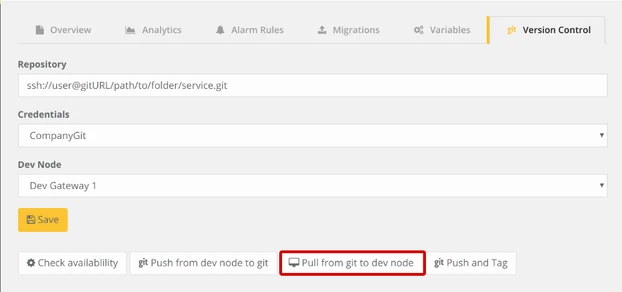
You can pull the Service from the configured Git repository to the selected "Dev Node" by simply click on [Pull from git to dev node]
DICOS API Gateway Manager will migrateIn your service from the Git repository to your "Dev Node" including the folder structure.