Install on OpenShift (Non Helm)
There is no mysql/mariadb image specified in the yaml.
Make sure that you have a project created for the DICOS API Gateway Manager
Remember to have the .lic dagm license at hand
Base understanding of how to encode in base64 and how to create a project in OpenShift and use the oc command
This guide will help with installing the DICOS API Gateway Manager (DAGM) on an OpenShift environment.
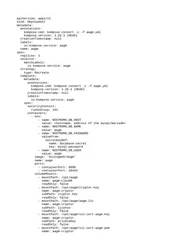
Please find attached the YAML file that you can download and use.
Instructions
- Request a license for the DAGM
- Download the yaml file.
- Create a certificate and a passwordless private key. There are many instructions online on how to do that, eg:
- Create a project in your OpenShift environment.
- Edit the yaml and replace the placeholders with the values that are required. The placeholders can be recognised because they are formatted as an xml element
. you will have to change the whole placeholder including the angle brackets (chevrons). The placeholders are the following:
This is the hostname or address of the mysql/mariadb instance that you are going to use.
This is the value of the password used by the DAGM to connect to the database. This will have to be base64 encoded before pasting it in the yaml.
This is the value of the certificate generated in step 3, it is clear text, and any newline should be substituted by \r\n see herebelow for instructions
https://gist.github.com/thomaslarsen/bc742bcd958896458d8006bdadf7d102
This is a passphrase used to encrypt data, you need to specify one, it should be an impossible-to-guess value, so it could be a binary value, you will need to encode it in base64 (even if a string) and copy it in here.
The base64 value of the private key generated in step 3
Copy here the base64 encoded string of the content of the .lic license file. You can use the command base64 license.lic and coy the output.
This is the public hostname of the Gateway Manager, the exposed URL hostname.
- use the oc command to create the project with the yaml.